In our lving room we have a homeserver, TV, and an amplifier with a 5.1 speakerbox setup. That is great for listening to music there, but somethimes we might want to listen to music in the dining room. Then the music is too far away. With snapcast is possible to have the same music playing synchronously at multiple places. Snapcast is an opensource synchronous multiroom audio player. This blogpost describes how to set it up.
Overview
There are actually quite some pieces involved. The following diagram shows them:
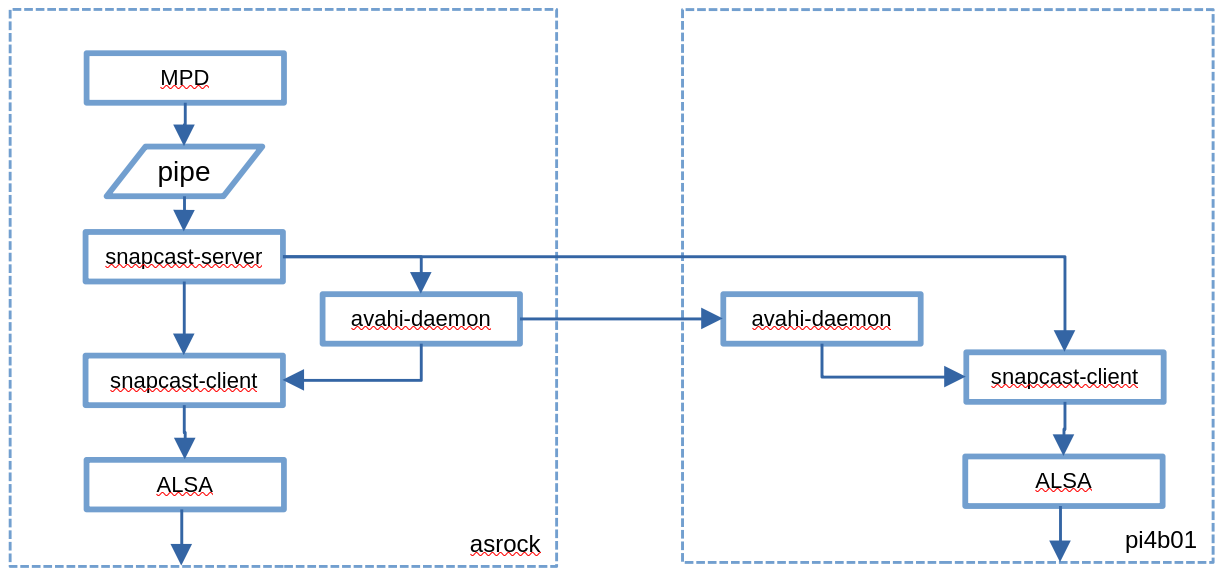
In the living room there is the homeserver is called asrock which runs Gentoo Linux. It has the following components:
- Music Player Daemon (MPD) the server-side application for playing the music. MPD normally outputs directly to ALSA but in order to feed snapcast it will need to write to a named pipe acting as a FIFO.
- The snapcast-server picks up whatever is written to the name pipe. It communicates over the network with the snapcast-clients to calculate any network delay and coordinates so that all the clients will play the music synchonously.
- Avahi is used to advertise the presence of the snapcast-server to the snapcast-clientes.
In the dining room I placed a set of active speakers hooked up over USB to a Raspberry Pi 4b called pi4b01 On it runs avahi, the snapcast-client, and of course ASLA.
To control the setup there are a few apps that can run on any Android phone or tablet:
- M.A.L.P. is an Android MPD client. It tells MPD which music to play.
- Snapdroid which can control the volume on the different parts of the snapcast network, and can also act as snapcast client.
Asrock homeserver
MPD configuration
MPD should no longer write directly to ALSA, but instead to a FIFO pipe, in this case called /tmp/snapfifo.
Update /etc/mpd.conf as follows:
    # No alsa output when using snapcast
    #audio_output {
    #  type "alsa"
    #  name "asrock alsa"
    #  device "iec958:CARD=PCH,DEV=0"
    #}

    # for snapcast:
    audio_output {
      type "fifo"
      name "my pipe"
      path "/tmp/snapfifo"
      format "48000:16:2"
      mixer_type "software"
    }
Snapcast server configuration
The snapcast server might work out of the box. Just check this in /etc/snapserver.conf:
source = pipe:///tmp/snapfifo?name=default
Snapcast client configurationn
The snapcast client needs to be configured to output to the right ALSA device. In my case that is device 14. Unfortunately this needs to be number, not a name.
Update /etc/conf.d/snapclient as follows:
    SNAPCLIENT_USER="--user snapclient:audio"
    SNAPCLIENT_OPTS="-s 14"
Pi4b01 dining room audio server with USB speakers
I used an old Raspberry Pi 4b for this, which had been collecting dust for a while. It is nice and small; it can actually be hidden behind the speakers. Putting Alpine Linux on it was an obvious choice for me: it uses the for me familiair init system OpenRC, and it runs mostly in memory, making it very suitable for embedded applications.
ALSA software installation and configuration
Install the ALSA software:
    # apt upgrade
    # apt add alsa-utils alsaconf
    # addgroup root audio
    # addgroup $USER audio
Unmute the audio devices, and find out which ALSA device to use:
    # alsamixer
    # rc-service alsa start
    # rc-update add alsa
    # aplay -L
Update the default devices for ALSA by editing /etc/asound.conf:
    defaults.ctl.card 9
    defaults.pcm.card 9
Verify with:
# speaker-test -t -c 2
snapcast-client
Snapcast is only available in the comunity repo. Update /etc/apk/repositories to enable it:
    /media/mmcblk0p1/apks
    http://ftp.halifax.rwth-aachen.de/alpine/v3.23/main
    http://ftp.halifax.rwth-aachen.de/alpine/v3.23/community
Update the URL to point to your favorite mirror.
Install the software with:
    # apt upgrade
    # apt add snapcast-client avahi
    # rc-service avahi-daemon start
    # rc-update add avahi-daemon
The speakers are Sanyun SW208 capable of Bluetooth and USB. USB is preferred because of the lower latency. However, the speakers sometimes start up un Blutooth mode, not exposing the USB audio profiles. In such cases the correct ALSA device is not created and then the snapclient fails to start.
To cope with this the normal startup script /etc/init.d/snapcast-client is not enabled, but instead custom scripts are used, ontrolled from the local service.
Note the SNAP_PARAMS of "-s 9"; this designates ALSA device to write to.
/etc/local.d/snapcast.start:
    #!/bin/bash
    SEMAFILE=/run/snapcast.sema

    snapcast_loop() {
        SNAP_PARAMS="-s 9"
        DELAY=10
        while [ -f ${SEMAFILE} ]
        do
            /usr/bin/logger "Starting snapclient"
            /usr/bin/snapclient ${SNAP_PARAMS}
            /usr/bin/logger "Snapclient ended, sleeping ${DELAY} seconds"
            /bin/sleep ${DELAY}
        done

    # Run the loop in the background
    touch ${SEMAFILE}
    snapcast_loop &
/etc/local.d/snapcast.stop:
    #!/bin/bash
    SEMAFILE=/run/snapcast.sema
    /usr/bin/logger "Removing snapclient semaphire file ${SEMAFILE}
    rm ${SEMAFILE}
    /usr/bin/logger "killall snapclient"
    /usr/bin/killall snapclient
Enable these scripts:
    # chmod +x /etc/local.d/snapcast.start /etc/local.d/snapcast.stop
    # rc-update add local
Save everything
Since Alpine runs in memory: an extra step is required to save all the work onto the memory card:
# lbu_commit